Why Two Identical-Looking USB-C Cables Can Charge at Completely Different Speeds
Why Two Identical-Looking USB-C Cables Can Charge at Completely Different SpeedsUSB-C was supposed to end cable confusion. One reversible plug for phones, lapto...

Community Author · October 15, 2026
Why Two Identical-Looking USB-C Cables Can Charge at Completely Different Speeds
USB-C was supposed to end cable confusion. One reversible plug for phones, laptops, tablets, headphones and game controllers, one charger in the drawer, one cable in the bag. In Europe that promise is now law. Since 28 December 2024, most new phones, tablets, cameras, headphones and similar devices sold in the EU have had to charge over USB-C. Since 28 April 2026, the same rule has covered new laptops.
Yet most people have had the same frustrating experience. You plug your laptop into a cable that looks exactly like the one that came in the box, and it charges at a crawl, shows a “slow charger” warning, or refuses to charge at all. Your phone fast-charges with one cable and dawdles with another. An external SSD copies files at a fraction of its rated speed.
The cause isn’t bad luck or a faulty port. The USB-C connector is only a shape. What actually flows through it depends on a conversation between three parties, the charger, the cable and the device. Each one has its own limits, and the slowest of the three decides the outcome. This article explains how that negotiation works, why the cable matters far more than its appearance suggests, and how to read the markings that are slowly making the system less of a guessing game.
The connector is not the standard
The first source of confusion is a naming problem. “USB-C”, properly “USB Type-C”, describes the physical connector and the cable built around it: 24 pins, reversible, and small enough for a phone. It doesn’t define how fast data moves or how much power flows. Those are set by separate specifications that share the same plug.
For power, the relevant standard is USB Power Delivery, usually shortened to USB PD. For data, the connector may carry anything from USB 2.0 at 480 megabits per second to USB4 Version 2.0 at 80 gigabits per second. Laptops may also use it for Thunderbolt or for video through DisplayPort Alternate Mode.
Two cables with identical plugs can therefore differ in at least three independent ways:
How much current they are rated to carry. This sets the maximum charging power.
Which data wires they contain. A basic charging cable may have only the USB 2.0 pair.
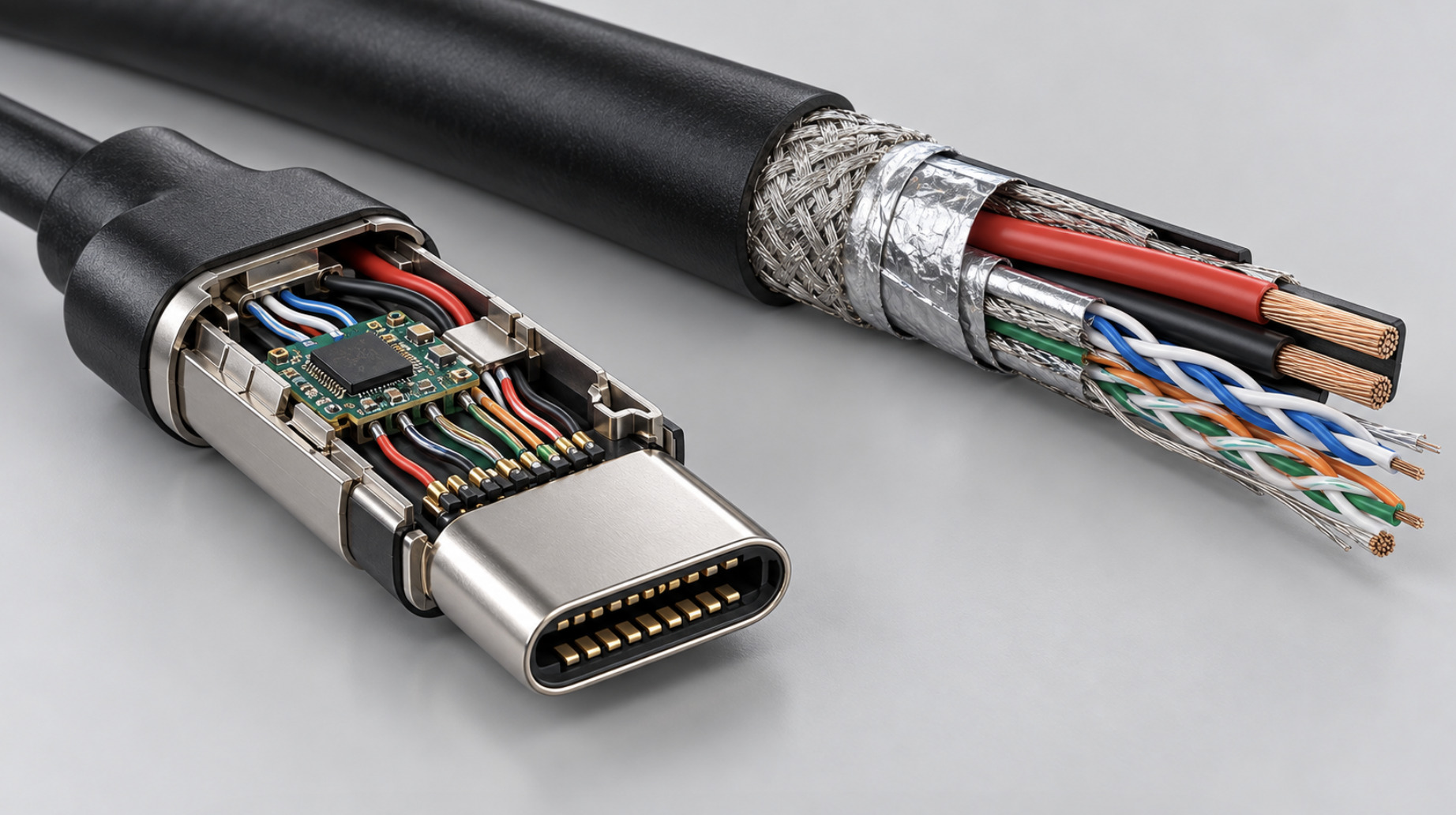
Whether they contain a small identification chip. Chargers and devices use this chip to learn what the cable can safely handle.
None of these differences is visible from the outside. A cable’s thickness hints at its capability, but not reliably: a thick cable may be thick because of its jacket rather than its conductors. The colour of the plug, the price and the brand say nothing definitive.
How charging power is actually decided
When you plug a device into a USB-C charger, the charger does not simply push out its maximum power. The process starts cautiously and escalates only when every party agrees.
Step one, the basic 5-volt handshake
Every USB-C connection begins at 5 volts. The USB Type-C specification uses the CC (configuration channel) wires in the cable to let the charger advertise how much current it can offer at that voltage. A resistor on the charger’s side signals one of three levels: the default USB current, 1.5 amps or 3 amps. The device measures this resistor and draws accordingly. At 5 V and 3 A, that is 15 watts, the ceiling of plain USB-C charging without any further negotiation.
That 15-watt figure is not arbitrary. It is also the line the EU uses in its common charger rules. Devices that charge at more than 15 W must support USB Power Delivery, so that fast charging can’t be locked behind a proprietary protocol.
Step two, the Power Delivery negotiation
If both the charger and the device support USB PD, they start exchanging digital messages over the CC wire. The charger, called the “source” in the specification, sends a list of what it can provide. A typical laptop charger might offer 5 V, 9 V, 15 V and 20 V, each with a maximum current. The device, the “sink”, picks the option it wants and requests it. The charger confirms, switches its output voltage, and only then does high power flow.
Raising the voltage is the key to higher power, because pushing more current through a thin cable and small connector pins creates heat. That is why a 100 W laptop charger delivers its power at 20 V rather than 5 V. At 5 V, 100 W would need 20 amps, far beyond what the connector can safely carry.
Step three, the cable gets a vote
Here is where identical-looking cables split apart. Under the USB Type-C specification, every compliant USB-C to USB-C cable must be able to carry at least 3 amps. To go above 3 amps, up to 5 amps, the cable must contain an electronic marker, usually called an e-marker. This small chip in the plug tells the charger the cable’s rated current, its maximum voltage and its data capabilities.
A charger that wants to deliver 5 amps first queries the cable. If no e-marker answers, the charger must assume the cable is only good for 3 amps. The consequences are concrete:
At 20 V, a 3-amp cable caps charging at 60 W.
With a 5-amp e-marked cable, the same charger and laptop can reach 100 W.
If your laptop wants 100 W and your charger can supply 100 W, an ordinary cable can still hold the whole system to 60 W.
The laptop usually still charges, just more slowly. Under heavy load, such as gaming or video export, the battery may even drain while it’s plugged in. Some operating systems flag this with a “slow charger” or “low-wattage charger” notification, which users understandably blame on the charger rather than the cable.
The power tiers in practice
USB PD has grown in stages. Since USB PD 3.1, announced in 2021, the specification divides the range into two parts. Standard Power Range (SPR) covers the familiar voltages up to 20 V and up to 100 W. Extended Power Range (EPR) adds fixed voltages of 28 V, 36 V and 48 V, at up to 5 amps, for a maximum of 240 W. EPR also adds an adjustable mode in which the device can request voltages between 15 V and 48 V in fine steps.
html
<table>
  <thead>
    <tr>
      <th>Mode</th>
      <th>Voltage</th>
      <th>Maximum current</th>
      <th>Maximum power</th>
      <th>Cable requirement</th>
      <th>Typical use</th>
    </tr>
  </thead>
  <tbody>
    <tr>
      <td>Basic USB-C current advertisement</td>
      <td>5 V</td>
      <td>up to 3 A</td>
      <td>15 W</td>
      <td>Any compliant USB-C cable</td>
      <td>Earbuds, accessories, slow phone charging</td>
    </tr>
    <tr>
      <td>USB PD, Standard Power Range</td>
      <td>5 V, 9 V, 15 V, 20 V</td>
      <td>3 A</td>
      <td>60 W</td>
      <td>Any compliant USB-C cable</td>
      <td>Phones, tablets, ultraportable laptops</td>
    </tr>
    <tr>
      <td>USB PD, Standard Power Range at 5 A</td>
      <td>20 V</td>
      <td>5 A</td>
      <td>100 W</td>
      <td>E-marked 5 A cable</td>
      <td>Mainstream and performance laptops</td>
    </tr>
    <tr>
      <td>USB PD, Extended Power Range</td>
      <td>28 V, 36 V, 48 V</td>
      <td>5 A</td>
      <td>140 W, 180 W, 240 W</td>
      <td>E-marked EPR cable rated for 50 V and 5 A</td>
      <td>Large laptops, mobile workstations, some monitors and docks</td>
    </tr>
  </tbody>
</table>
An EPR connection needs every link in the chain to support it. The charger must offer EPR voltages, the device must request them, and the cable must identify itself through its e-marker as EPR-capable. A cable that was rated for 5 amps at 20 V before EPR existed doesn’t qualify. If any piece is missing, the connection stays in the Standard Power Range, and a laptop that wants 140 W falls back to 100 W or less.
Why your phone charges differently from your laptop
Phones add a second layer of complexity. Many fast-charging phones don’t use the fixed voltage steps alone. They rely on a USB PD feature called Programmable Power Supply, or PPS. With PPS, the phone asks the charger for a voltage adjustable in very small increments and changes its request continuously as the battery fills.
The reason is heat. Every conversion from one voltage to another inside a phone produces heat, and heat both slows charging and ages the battery. With PPS, the charger does more of the voltage conversion, and the phone does less. Samsung’s top “Super Fast Charging” tiers, for example, require a charger that supports PPS. Its highest tier also needs a 5-amp cable, so the same phone and the same charger can fall back to a slower mode with the wrong cable.
Two common situations explain much of the confusion.
A 100 W laptop charger can charge a phone more slowly than a 25 W phone charger. If the laptop charger supports USB PD fixed voltages but not PPS, a phone that needs PPS for its top speed falls back to a slower mode. Wattage on the label is not the same as compatibility.
Older proprietary systems never fully went away. Before USB PD became universal, several manufacturers developed their own fast-charging protocols. Some phones and chargers still support these alongside USB PD. A fast charge that worked with one brand’s charger may not appear with another’s, even when the wattage is similar. The EU rule aims to fix this by requiring USB PD on devices above 15 W. Manufacturers can still offer their own protocols, but USB PD must work.
The charger is not always the bottleneck you think it is
Even with the right cable, the charger’s printed wattage can mislead.
Multi-port chargers share their power. A charger labelled 100 W with three ports rarely supplies 100 W to each port at once. When a second device is plugged in, the charger usually renegotiates and splits its total output. The laptop that was charging at 100 W may suddenly drop to 65 W or less. This is normal behaviour, and the split rules are often printed in small type on the charger itself.
Charging speed changes during the charge. Phones and laptops charge fastest when the battery is fairly empty and slow down as it fills, typically sharply in the last fifth of capacity. A high wattage figure on the charger describes the peak, not the average. Measuring “charging speed” by checking the battery percentage after ten minutes says more about the battery’s state than about the charger or cable.
Temperature intervenes. Most devices throttle charging when the battery or the device gets warm. A phone charging on a sunny windowsill, under a pillow or while running a demanding game may never reach its advertised speed, whatever the cable.
Data speed is a separate problem with the same cause
Charging is the most common frustration, but data transfer works the same way. Many cheap USB-C cables, and many cables bundled with phones, contain only the USB 2.0 data pair. They carry power perfectly well but transfer data at 480 megabits per second, the speed of USB in the early 2000s.
For phones this rarely matters, because most people don’t move large files over a cable. For external SSDs, docks and monitors it matters a great deal. A fast external SSD on a USB 2.0 cable runs at a small fraction of its rated speed, and a monitor connected through a USB-C dock may not display anything at all. Video over USB-C uses the high-speed wires that basic cables simply don’t contain.
There is a physical trade-off as well. The faster the data rate, the harder it is for a passive cable, one with no signal-boosting electronics, to carry the signal over distance. High-speed passive cables are therefore typically short, often a metre or less for the fastest classes. Longer high-speed cables usually need active electronics, which raises the price. A two-metre cable sold cheaply as a “charging cable” is almost certainly a USB 2.0 cable. That’s fine for charging, but no good for a monitor or fast storage.
html
<table>
  <thead>
    <tr>
      <th>Current consumer marking</th>
      <th>Older technical names</th>
      <th>Nominal data rate</th>
      <th>What it is good for</th>
    </tr>
  </thead>
  <tbody>
    <tr>
      <td>USB 2.0 or no data marking</td>
      <td>USB 2.0 High Speed</td>
      <td>480 Mbps</td>
      <td>Charging, keyboards, mice, basic phone sync</td>
    </tr>
    <tr>
      <td>USB 5Gbps</td>
      <td>USB 3.0, USB 3.1 Gen 1, USB 3.2 Gen 1</td>
      <td>5 Gbps</td>
      <td>Hard drives, basic external storage</td>
    </tr>
    <tr>
      <td>USB 10Gbps</td>
      <td>USB 3.1 Gen 2, USB 3.2 Gen 2</td>
      <td>10 Gbps</td>
      <td>Most external SSDs, many docks</td>
    </tr>
    <tr>
      <td>USB 20Gbps</td>
      <td>USB 3.2 Gen 2x2, USB4 20Gbps</td>
      <td>20 Gbps</td>
      <td>Fast external SSDs on supporting hosts</td>
    </tr>
    <tr>
      <td>USB 40Gbps</td>
      <td>USB4 Version 1.0, compatible with Thunderbolt 3 and 4 cables in most cases</td>
      <td>40 Gbps</td>
      <td>High-end docks, displays, fast storage</td>
    </tr>
    <tr>
      <td>USB 80Gbps</td>
      <td>USB4 Version 2.0</td>
      <td>80 Gbps</td>
      <td>Newest docks, displays and storage on supporting hardware</td>
    </tr>
  </tbody>
</table>
The renaming history is a large part of why consumers struggle. The same 5-gigabit standard was called USB 3.0, then USB 3.1 Gen 1, then USB 3.2 Gen 1. The USB Implementers Forum, the industry body that maintains the specifications, eventually moved consumer branding to plain speed figures such as “USB 10Gbps” and “USB 40Gbps”. The old names, however, live on in product listings, specification sheets and reviews.
Why the industry let this happen
It is tempting to see this as a design failure, but the situation follows from a deliberate choice. USB-C was designed to scale across very different devices, from a pair of earbuds drawing a few watts to a workstation drawing well over 100 W. Requiring every cable to support 240 W and 80 gigabits would have made every cable expensive, thick and short. Earbuds and keyboards don’t need that.
So the specification lets cables differ, and relies on negotiation and electronic identification to keep things safe. In engineering terms the system largely works: a basic cable shouldn’t overheat when plugged into a powerful charger, because the charger shouldn’t push more than 3 amps through a cable that hasn’t identified itself as capable of more. The failure is in communication with the user, not in safety.
That safety model depends on compliance, however. In the early years of USB-C, non-compliant cables were a real problem. In 2015 and 2016 a Google engineer, Benson Leung, publicly reviewed USB-C cables sold online and found many that were wired incorrectly. Among them were USB-A to USB-C cables with the wrong resistor, which could let a device draw more current than an older port or charger could safely deliver. One badly wired cable damaged his test laptop. His reviews pushed retailers and manufacturers toward compliance and remain a reminder that uncertified cables are not always just slower. Occasionally they are wrong.
The labelling fix, and why it is arriving slowly
The USB Implementers Forum has offered a partial answer for several years: certified cable logos that state power and data capability directly. A certified USB-C cable can carry a logo showing its power rating, 60W or 240W, and, where relevant, a data rate such as USB 40Gbps or USB 80Gbps. For certified cables, these markings are not optional decoration. In USB-IF certification testing, a cable without the appropriate power logo fails the consistency check.
The limitation is obvious. Certification is voluntary, and a large share of the cables sold online have never been near a certification lab. Many carry their own markings, such as “100W”, “PD” or “fast charge”, which follow no standard at all.
The EU is now turning part of this voluntary labelling into law, in two steps.
The first is already in force. Under Directive (EU) 2022/2380, which amended the Radio Equipment Directive, devices in scope must charge over USB-C. Those that charge at more than 15 W must support USB PD. Manufacturers must offer the device without a charger, and the packaging must state whether a charger is included. A label must also show the device’s power requirements, so buyers know whether a charger they already own is adequate. This applied to phones and most small electronics from 28 December 2024 and to laptops from 28 April 2026. The directive also asks the Commission to report by 28 December 2026 on whether the unbundling approach should be extended to cables.
The second step targets chargers and cables directly. Commission Regulation (EU) 2025/2052, adopted in October 2025 under the ecodesign framework, covers external power supplies, wireless chargers, chargers for portable batteries and, for the first time, USB-C cables. It applies from 14 December 2028. Its requirements include:
Cable power ratings. A USB-C cable within its scope is defined with a power rating of either 60 W or 240 W, the two certified tiers.
Marking on the plugs. The overmoulds of both plugs must be printed with “60W” or “240W”. Anyone holding the cable will be able to see its power class without packaging or a specification sheet.
Interoperable chargers. Most mains chargers must be “interoperable”, fitted with at least one USB-C or USB PD port. Chargers with a rated output above 100 W are exempt from this requirement.
html
<table>
  <thead>
    <tr>
      <th>Measure</th>
      <th>Legal instrument</th>
      <th>Applies from</th>
      <th>What it changes for buyers</th>
    </tr>
  </thead>
  <tbody>
    <tr>
      <td>USB-C charging port on phones, tablets, cameras, headphones, earbuds, handheld consoles, portable speakers, e-readers, keyboards, mice and navigation devices</td>
      <td>Directive (EU) 2022/2380</td>
      <td>28 December 2024</td>
      <td>One cable type for most small electronics</td>
    </tr>
    <tr>
      <td>USB PD required for devices charging above 15 W</td>
      <td>Directive (EU) 2022/2380</td>
      <td>28 December 2024</td>
      <td>Fast charging no longer depends on a proprietary charger</td>
    </tr>
    <tr>
      <td>Devices sold without a charger as an option, plus pictogram and power label</td>
      <td>Directive (EU) 2022/2380</td>
      <td>28 December 2024</td>
      <td>Buyers can check whether an existing charger is adequate</td>
    </tr>
    <tr>
      <td>Same rules extended to laptops</td>
      <td>Directive (EU) 2022/2380</td>
      <td>28 April 2026</td>
      <td>New laptops charge over USB-C with USB PD</td>
    </tr>
    <tr>
      <td>Ecodesign rules for chargers and USB-C cables, including "60W" or "240W" printed on both plugs</td>
      <td>Regulation (EU) 2025/2052</td>
      <td>14 December 2028</td>
      <td>Cable power class visible on the cable itself</td>
    </tr>
  </tbody>
</table>
Note what the 2028 rules don’t do. The marking requirement covers power, not data speed. A cable stamped “240W” may still be a USB 2.0 cable. For docks, monitors and fast storage, buyers will still need to look for a data-speed marking or check the specification.
The laws also don’t change the physics. Even a perfectly labelled 240 W cable won’t make a 65 W charger deliver more than 65 W, or make a phone accept more power than its battery management allows. The labels make the weakest link visible. They don’t remove it.
How to diagnose a slow charge
When a USB-C device charges more slowly than expected, the cause can usually be found by changing one variable at a time. The following matrix covers the most common situations.
html
<table>
  <thead>
    <tr>
      <th>Symptom</th>
      <th>Most likely cause</th>
      <th>How to confirm</th>
    </tr>
  </thead>
  <tbody>
    <tr>
      <td>Laptop charges, but the system warns of a slow or low-wattage charger</td>
      <td>Cable limited to 3 A, so power capped at 60 W, or charger below the laptop's requirement</td>
      <td>Try the cable that came with the laptop, or a cable certified for 240 W, with the same charger</td>
    </tr>
    <tr>
      <td>Laptop drains while plugged in under heavy load</td>
      <td>Negotiated power is below the laptop's peak consumption</td>
      <td>Compare the charger's rating and the cable's current rating with the laptop's specified charger wattage</td>
    </tr>
    <tr>
      <td>Phone fast-charges with its own charger but not with a powerful laptop charger</td>
      <td>Phone relies on PPS, which the laptop charger does not support</td>
      <td>Check the charger's label or specification for PPS support</td>
    </tr>
    <tr>
      <td>Charging slows when a second device is plugged into the same charger</td>
      <td>Multi-port charger is splitting its total output</td>
      <td>Unplug the second device and see whether the speed recovers</td>
    </tr>
    <tr>
      <td>Fast charge works at a low battery level but slows past roughly 80 percent</td>
      <td>Normal battery charging curve</td>
      <td>No action needed. The battery is protecting itself</td>
    </tr>
    <tr>
      <td>External SSD is far slower than its rated speed</td>
      <td>USB 2.0 cable or a slower port on the computer</td>
      <td>Use a cable marked USB 10Gbps or faster, and plug into a port that supports that speed</td>
    </tr>
    <tr>
      <td>Monitor or dock shows no picture over USB-C</td>
      <td>Cable lacks high-speed wires, or the computer's port does not support video output</td>
      <td>Use a cable rated for USB 40Gbps or a full-featured cable, and check the port's video support</td>
    </tr>
  </tbody>
</table>
What to look for when buying a cable
The practical guidance follows directly from how the system works.
Match the cable to the most demanding device you own. A cable certified for 240 W works safely with every charger and device, because the negotiation always settles at the lowest common capability. Buying a 240 W cable for a laptop that draws 65 W costs a little more, but the cable won’t limit a future laptop or charger.
Separate charging cables from data cables in your head. A long, flexible cable for charging at the bedside or in a car does not need to carry data fast. A short cable for an SSD or a dock does. Trying to make one cable do everything usually means a cable that is either short and expensive or long and slow for data.
Trust certification marks over marketing terms. “PD”, “fast charge” and “super fast” on packaging are not standardised claims. A USB-IF certification logo showing 60W or 240W, and a speed such as USB 10Gbps or USB 40Gbps, is a tested statement.
Keep the cable that came with a laptop. Laptop makers usually ship a cable matched to the charger. If the original cable goes missing, the replacement should carry at least the same power rating, which means a 5-amp e-marked cable for anything above 60 W.
Be cautious with very cheap adapters and USB-A to USB-C cables. Most of the cables found to be non-compliant in the early USB-C years were in this category. A well-made cable from a reputable source is cheap insurance for an expensive laptop or phone.
The bigger picture
The USB-C story is a useful case study in how standards evolve. The connector solved the physical problem quickly. Within a few years, almost every new device shared the same plug. What it did not solve, by design, was capability: a single plug was asked to serve products whose needs differ by a factor of a hundred in power and of a hundred and more in data rate.
The engineering answer was negotiation, chips that let chargers, cables and devices agree on what is safe. The consumer answer, still unfolding, is labelling. Voluntary certification logos have existed for years. EU law now makes power information visible on device packaging, and from December 2028 it will be printed on the cables themselves.
Until then, the practical rule is simple. When two USB-C cables look the same but behave differently, the difference is real and lives inside the plug. The charger, the cable and the device each set a ceiling, and the lowest ceiling wins.